YouTube Shorts aspect ratio: the 9:16 file that posts
The YouTube Shorts aspect ratio is 9:16 at 1080 by 1920. See why a file that looks vertical still misses the feed, plus the 2026 size and safe zone.
September 28, 2026 · 10 min read

Author
codeBeboo
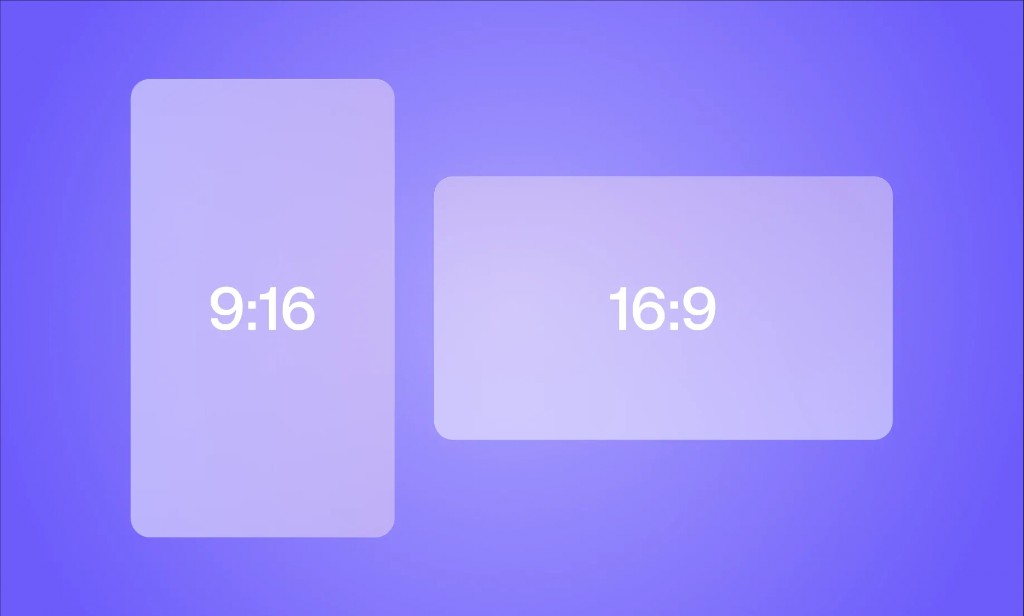
The YouTube Shorts aspect ratio is 9:16. Export that as 1080 by 1920 pixels and, if the video is 3 minutes or shorter, YouTube puts it in the Shorts feed.
A frame that looks vertical on your timeline is not the same thing. If the file itself is 1920 by 1080 with black bars down the sides, YouTube reads a widescreen video and sends it to the long-form watch page. The picture in the middle can be as tall as you like. The file's width and height are what get counted.
This is the 2026 classification rule, the pixel sizes that qualify, and the band of the frame where a caption disappears under the like button.
YouTube Shorts aspect ratio in 2026
YouTube states the rule on its help page for three-minute Shorts. Any video uploaded on or after 15 October 2024 with a square or vertical aspect ratio, up to three minutes, is categorised as a Short. A video uploaded before that date stays on the long-form watch page, even if the footage is vertical. A fresh upload of the same clip follows the current rule.
If you do not want that classification, YouTube's instruction is blunt: use a wider ratio such as 16:9. That sentence is the whole policy. It is on the three-minute Shorts help page.
I would stop treating #Shorts as a switch. The hashtag is not in that help page. A 16:9 file with the tag in the title is still a normal video. A 9:16 file under 3 minutes is a Short with or without it.
The videos people still watch do not mention any of this. Camber Film School's "BEST Aspect Ratio for YouTube SHORTS" sits at 321,685 views and is about five years old. The opening move is a Final Cut swap: 1920 by 1080 becomes 1080 by 1920. Kapwing's "How to Resize Videos for YouTube Shorts" has 669,913 views and is the same age. Both teach the canvas. Neither can tell you about a rule from October 2024. That is why r/NewTubers is still asking, in 2026, why a vertical edit did not become a Short.
YouTube Shorts dimensions and size
People look up YouTube Shorts size and YouTube Shorts resolution as if they were different knobs. They are one rectangle.
1080 by 1920. Width first, then height. Nine parts across, sixteen down. Save that as the preset in CapCut, DaVinci Resolve, Premiere, or Final Cut, before you drop a clip on the timeline.
| What you export | Pixels, width by height | Ratio | Where it goes |
|---|---|---|---|
| Full-screen Short | 1080 by 1920 | 9:16 | Shorts feed, if it is 3 minutes or under |
| Same shape, fewer pixels | 720 by 1280 | 9:16 | Still a Short. Soft on a current phone |
| Square | 1080 by 1080 | 1:1 | A Short, with empty space beside the picture |
| 3:4 portrait | 1080 by 1440 | 3:4 | A Short. Taller than square, shorter than 9:16 |
| 4:5 portrait | 1080 by 1350 | 4:5 | A Short. Common on Instagram, stubbier here |
| Widescreen | 1920 by 1080 | 16:9 | Long-form watch page, even at 15 seconds |
| Old television shape | 1440 by 1080 | 4:3 | Long-form. Wider than it is tall |
A 2160 by 3840 export is the same 9:16 shape with four times the pixels. Skip it unless you already master in 4K. The Shorts feed does not reward the extra file size, and a phone does not show it.
A preset worth saving
Set the project to 1080 by 1920 before the first clip. 30 frames a second is enough for a story, a fact, or a stickman explainer. Use 60 only when the source was already 60, usually gameplay. Export H.264 inside an MP4. Then read the file's pixel size back. If it is not 1080 by 1920, the preset did not stick, and uploading will not fix it.
A vertical picture on a horizontal file
This is the failure from a June 2026 r/NewTubers thread. The editor had a 9:16 clip in Premiere. YouTube did not treat the upload as a Short. The reply that helps is dull: the exported file has to be vertical, not a horizontal canvas with the vertical footage sitting inside it.
Premiere and Resolve both allow the mismatch. The sequence can be 1080 by 1920 while the delivery preset is still 1920 by 1080. The preview looks tall. The file on disk is widescreen, with your Short boxed in the middle by black bars. YouTube classifies the file, not the preview.
Open it before you upload. On a Mac, Get Info shows the pixel size. On Windows, the file properties do. You want the first number smaller than the second. If you see 1920 then 1080, re-export.
A second reply on the same subreddit is still the old rule: YouTube only makes it a Short under 1 minute. That was the cap before 15 October 2024. The YouTube Shorts length limit is now 3 minutes for a square or vertical upload. Under a minute is a pacing choice. It is not the gate.
The YouTube Shorts aspect ratio test is those two numbers on the exported file. Project names do not count.
YouTube Shorts safe zone
Filling the phone is not the same as being readable.
On a 1080 by 1920 Short, the app paints controls over the picture. A framing walkthrough that Shorts editors pass around puts the busy bands at about 250 pixels from the top, about 350 to 400 pixels from the bottom, and about 150 pixels on the right. Those figures are not a line in YouTube's spec. They are where the viewer count, the caption, the channel name, and the like button sit in practice. Keep the hook text in the middle.
Faceless videos live on that line of text. A Reddit story that opens with the confession under the description, or a fact whose number sits on the like button, gets swiped. The first second of a viral YouTube Short has to be readable, and readable means off that bottom band.
I would shrink the caption before I shove it lower to make the line fit. If the sentence does not sit in the middle, the script is too long for the frame.
Square, 3:4, and the 4:3 question
3:4 can be a Short. It is taller than it is wide, so it meets the vertical test. A 1080 by 1440 file, 3 minutes or under, uploaded on or after 15 October 2024, can enter the Shorts feed. It will not cover the screen the way 9:16 does. You get a shorter picture and more empty frame around it. 4:5 (1080 by 1350) works the same way. Fine if the source is already that shape. A poor preset for something you are building from scratch.
4:3 is the opposite answer. Four across and three down is wider than it is tall, so it fails the square-or-vertical test. It behaves like 16:9. Long-form, even at 20 seconds. The watch page is built for 16:9. 4:3 is a leftover television shape, not a Shorts format, and not the ratio to pick for a new long video either.
Square is the argument. YouTube's help page includes it. A 1080 by 1080 upload can be a Short. In March 2026 a poster on r/youtube said the mobile app cropped a 1:1 file that had uploaded cleanly a few days earlier. Their workaround was to choose Video, not Short, in the app, and let classification happen after the upload. I would not plan a channel around an app bug. On a phone, 9:16 avoids the crop fight.
One gaming creator on r/NewTubers keeps 1:1 on purpose, bars included, because a 9:16 crop cuts the HUD off. They say the Shorts still get watched. That trade is real for a game. It is a bad trade for captions, stickman explainers, and Reddit stories, where the words need the tall frame and the side bars only shrink the type.
If you want one ratio, use 9:16 at 1080 by 1920. Square is allowed. It is the worse default for a faceless channel.
One file for Shorts, Reels, and TikTok
TikTok and Reels use the same vertical frame. Export the clean master once. Do not download your own TikTok and hand that file to YouTube. The watermark lands in the band you just cleared, and the picture is a second compression.
How to make faceless TikTok videos uses that same 9:16 frame. On YouTube, how to make YouTube Shorts is a normal Studio upload. There is no separate Shorts button on desktop when the pixels and the length are already right.
If you would rather not babysit sequence presets, an AI YouTube Shorts generator can turn a faceless script into a vertical video that is already 1080 by 1920. Check the file once anyway. Ten seconds of looking beats a long-form upload you meant as a Short.
FAQ
Is the YouTube Shorts aspect ratio 9:16?
Yes. 9:16 at 1080 by 1920 is the size that fills a phone. Square also qualifies. Widescreen does not.
Is YouTube 16:9 or 4:3?
The long-form watch page is 16:9, usually 1920 by 1080. 4:3 is an older television shape. Neither is a Short. Shorts are 9:16, or square if you accept the side space.
Which aspect ratio is best for YouTube Shorts?
9:16. It is the common ratio that both qualifies as a Short and fills the screen. Use 1:1 only when a vertical crop would cut off something you need, such as a game HUD.
Can YouTube Shorts be a 3:4 ratio?
Yes. 3:4 is vertical, so 1080 by 1440 can be categorised as a Short when it is 3 minutes or under and the upload date is 15 October 2024 or later. It leaves more empty space than 9:16. Keep it for source footage that is already 3:4.
Why is my 9:16 video not a Short?
Usually the timeline is 9:16 and the file is not. Check the exported pixel size. If the width is larger than the height, you exported a 16:9 canvas with bars. Over 3 minutes, a vertical video is a normal video. An upload from before 15 October 2024 was left as long-form on purpose.
Does #Shorts change the classification?
No. The shape of the file, the length, and the upload date do. A hashtag does not turn 1920 by 1080 into a Short.
Continue reading
In this guide series
Ready to put this into practice?
Generate a faceless ShortRead more

YouTube Shorts monetization in 2026: what you get paid
YouTube Shorts monetization in 2026 is a share of the ad pool, not a price per view. The YPP bars, the 1 February 2027 test, and what 1,000 views paid.
20 Best Faceless YouTube Channels in 2026 (And How They Make Money)
The biggest faceless YouTube channels, broken down by format, niche, estimated earnings, and what makes each one actually work. With actionable takeaways.
Clippie.ai alternatives
Clippie.ai alternatives for faceless YouTube automation — compare features, pricing, and Taletok for long-form channels.
27 Faceless YouTube Channel Ideas That Actually Make Money in 2026
27 proven faceless YouTube channel ideas with RPM estimates, difficulty ratings, and real example channels — organised by format type. Updated for 2026.